
The Email Blocklist feature is designed to prevent unwanted or suspicious users and spam bots from accessing your site. By blocking specific email addresses or entire domains, you can effectively stop spam registrations, fraudulent WooCommerce orders, and unauthorized activities before they happen.
Key Capabilities
The Email Blocklist provides several layers of protection:
- Targeted Blocking: Block specific email addresses or use wildcards to block entire domains (e.g.,
*@spam-domain.com). - Disposable Email Prevention: Stop spam registrations from temporary or disposable email services.
- Account Protection: Block problematic users without needing to delete their existing accounts.
- E-commerce Security: Protect WooCommerce orders from being placed using fraudulent email addresses.
How to Configure Email Blocklist
- Navigate to Ultimate Security > Email Blocklist in your WordPress dashboard.
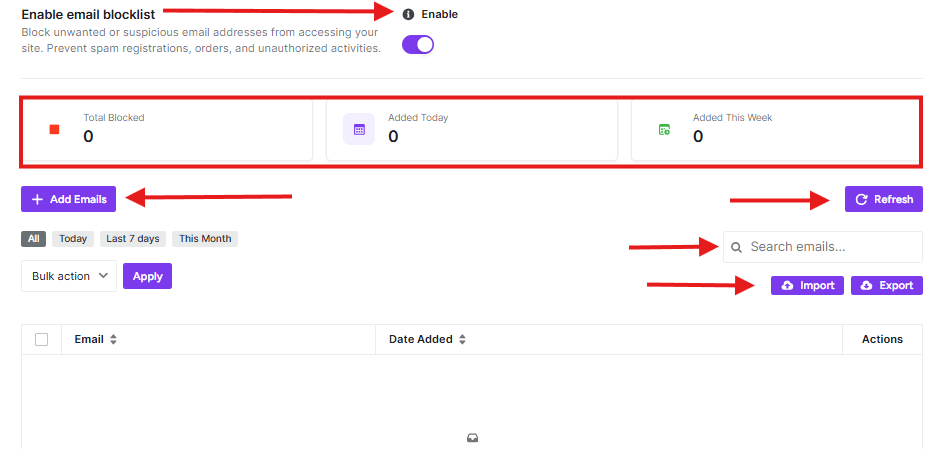
- Toggle the Enable email blocklist switch to ON to activate the protection.
- Use the + Add Emails button to manually add addresses or domains to your list.
Monitoring Blocklist Activity
The dashboard features a real-time statistics bar to help you track the effectiveness of your blocklist:
- Total Blocked: The cumulative number of emails currently restricted.
- Added Today: Shows how many new entries were added within the last 24 hours.
- Added This Week: Monitors growth in your blocklist over the current week.
Managing the Blocklist Table
Once you start adding emails, they will appear in the management table where you can view the Email address and the Date Added.
- Search & Filter: Quickly find specific entries using the Search emails… bar or filter by timeframes such as Today, Last 7 days, or This Month.
- Bulk Actions: Select multiple entries to delete or modify them simultaneously using the Bulk action dropdown.
- Import/Export: Use the Import button to upload a CSV of known spam addresses, or Export your current list for use on other websites.
Pro-Tip
Use Wildcards Wisely: If you notice a high volume of spam coming from a specific provider, blocking the entire domain (e.g.,
*@example-spam.com) is much more efficient than blocking individual users one by one.


