
Self Defense
Require verification before the plugin can be deactivated, watch its own files for changes, and get alerts when someone tries to turn it off.
On this page
This feature keeps your security plugin safe from being turned off by bad people.
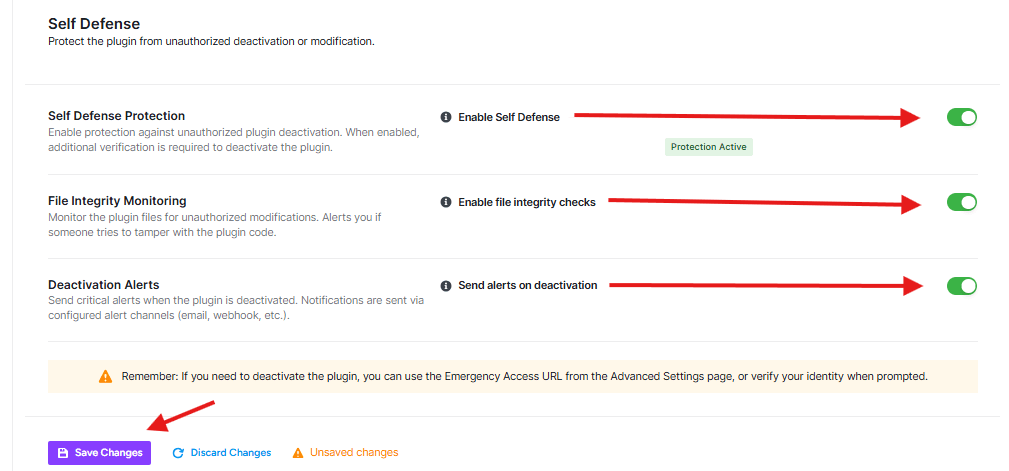
Enable Self Defense:
- When this is ON (green), it means:
- No one can turn off your security plugin
- If someone tries to turn it off, they’ll need to prove who they are first
- Your website stays protected
File Integrity Monitoring
This feature watches your security plugin files to make sure no one changes them.
- Enable file integrity checks: When this is ON (green), it means:
- The plugin checks if any files have been changed
- If someone tries to mess with your plugin code, you’ll get an alert
- Your security stays strong and trustworthy
Deactivation Alerts
This feature tells you when someone tries to turn off your security plugin.
- Send alerts on deactivation: When this is ON (green), it means:
- You’ll get a message if someone tries to turn off your security
- Alerts can come to your email or other places you set up
- You’ll know right away if something suspicious happens
Important Warning
If you ever need to turn off this security plugin (maybe to fix something), remember:
- You can use the “Emergency Access URL” from the Advanced Settings page
- Or you’ll need to prove it’s really you trying to turn it off
Was this article helpful?
Thanks for the feedback.