
Stay informed about suspicious activity on your site with real-time alerts and activity summaries.
Activity Overview
The notification dashboard provides a quick snapshot of the last 24 hours and the past 7 days, including:
- Failed Logins: The number of incorrect password attempts.
- Lockouts: How many times users or bots were actively blocked from logging in.
- Total Events: A summary of all security-related login activity over the last week.
Configuration
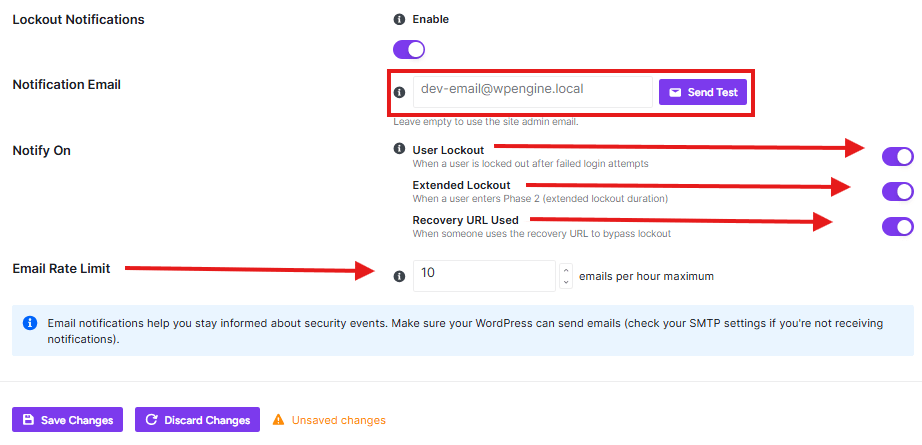
- Enable Login Notifications: Toggle this switch to start receiving alerts about failed attempts and lockouts.
- Notification Email: Enter the email address where alerts should be sent. If left empty, the plugin will default to your WordPress site admin email.
- Send Test: Use the Send Test button to ensure your server’s email system is correctly delivering notifications.
Real-time Alerts
Configure specific triggers to receive immediate notifications:
- Failed Login Alerts: Enable notifications for repeated failed attempts. You can set a Threshold (e.g., 3 failed attempts) to filter out common typos.
- Account Lockout Alerts: Get notified instantly whenever the Brute Force protection system locks out a user account.
- Successful Login After Failures: Receive an alert when a successful login occurs following multiple failed attempts, which may indicate a successful “password guess”.
- New Location/Device Alerts: Get notified when a user logs in from an unrecognized IP address or a new browser/device.
Digest Emails
If you prefer periodic updates over instant alerts, you can schedule automated security reports:
- Daily Digest: Enable this to receive a daily summary of security activity. You can customize the specific Send at time (e.g., 09:00 AM).
- Weekly Summary: Enable this to receive a broader overview of the week’s events. You can choose the specific day of the week (e.g., Monday) for delivery.
Additional Security Options
Enhance the detail and utility of your notification emails:
- Include Geolocation: Automatically shows the country, city, and region for every IP address mentioned in your notifications.
- One-Click Block: Adds a button to alert emails that allows you to instantly block an attacking IP address directly from your inbox.
Recent Activity Log
The Recent Activity section at the bottom of the page displays a live feed of login events, showing the Type (Success/Failure), User Details, IP Address, and the exact Time of the event. You can use the Refresh button to update the list or Clear History to reset the log.


