
The Admin Password Authentication feature adds a layer of administrative oversight to your site’s login process. This tool allows high-level users to access lower-level user accounts using their own administrative credentials, ensuring you can manage site content or troubleshoot user issues without needing to reset or know individual user passwords.
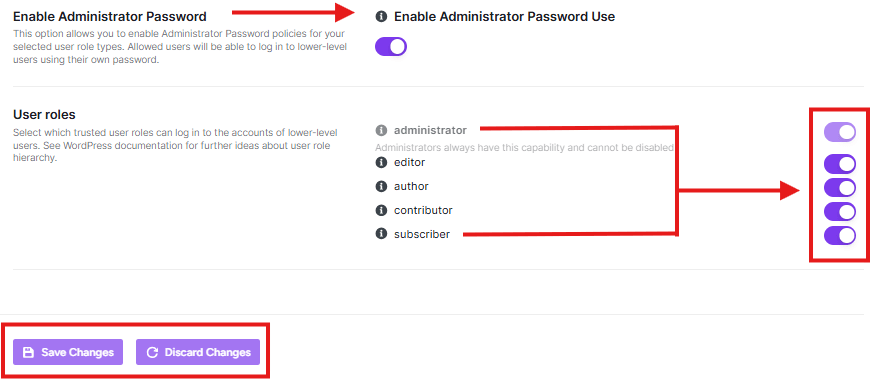
How to Enable Admin Password Use
To activate this policy for your WordPress site:
- Navigate to the Login Hardening section in the sidebar.
- Click on the Admin Password Authentication tab.
- Locate the Enable Administrator Password Use toggle.
- Switch the toggle to ON.
- Click Save Changes at the bottom of the screen.
User Roles Configuration
Once enabled, you can define which specific roles are subject to this authentication policy. This allows trusted high-level roles to log into the accounts of lower-level users.
- Administrator: This role always has this capability enabled by default and cannot be disabled.
- Target Roles: You can toggle access for the following roles:
- Editor
- Author
- Contributor
- Subscriber
Note: Always ensure that only trusted high-level roles are granted the ability to bypass standard user logins to maintain the integrity of your site’s security hierarchy.


