
SMS Authentication provides enterprise-grade multi-factor security by sending a 6-digit verification code directly to a user’s mobile device during the login process. This ensures that even if a password is compromised, an attacker cannot gain access without physical possession of the user’s phone.
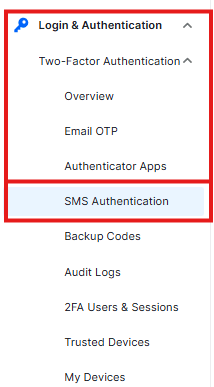
To configure these settings, navigate to Login & Authentication > Two-Factor Authentication > SMS Authentication.
Enable SMS Authentication
This toggle activates the SMS-based verification system for your WordPress site.

- Function: Switch to Enable to allow users to receive 6-digit verification codes via SMS during login.
- Requirement: SMS 2FA requires a Twilio account. You must sign up at twilio.com to obtain your API credentials before this feature can send messages.
Enable for Roles
This setting allows you to enforce SMS-based security for specific segments of your user base.
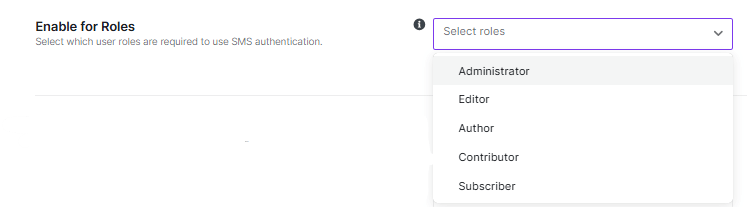
- Selection: Use the Select roles dropdown to choose which user levels (e.g., Administrator, Editor, Subscriber) are required to use SMS authentication.
- Management: Use the Select All button to mandate SMS 2FA for every user on the site, or Remove All to clear your current selections.
Twilio Configuration
To enable SMS delivery, you must connect the plugin to your Twilio account using your unique API credentials.
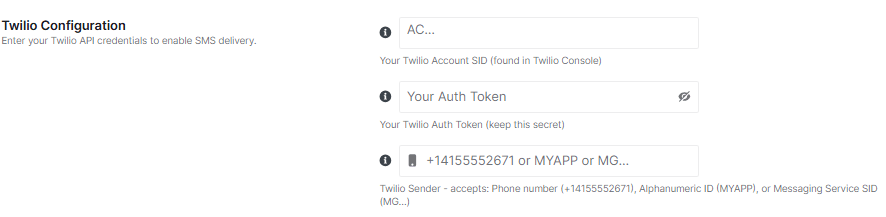
Twilio Account SID
The Account SID acts as the primary identifier for your Twilio account.
- Action: Enter your Twilio Account SID into the field.
- Location: You can find this string in your Twilio Console dashboard.
Your Auth Token
The Auth Token serves as the password for your API requests.
- Action: Enter your Auth Token into the masked field.
- Safety: Keep this token secret. Do not share it or display it in public screenshots.
Twilio Sender
The sender identity tells the recipient who the message is from.
- Supported Formats: You can enter a phone number (e.g.), an alphanumeric ID (e.g.), or a messaging service SID (starting with
MG...). - Formatting: Phone numbers must be entered in E.164 format (
+[country code][number]). - Alphanumeric Constraints: These must be 2–11 characters long and consist of letters and numbers only.
International SMS Requirements
Many countries require a registered alphanumeric sender ID to successfully receive SMS messages. Using a standard US or international phone number in these regions will result in Error 21612.
Countries requiring registration include:
- Bangladesh, India, Pakistan, Philippines, Vietnam
- Saudi Arabia, UAE, Egypt, Nigeria, Kenya
- Indonesia, Thailand, Malaysia, and many others
IMPORTANT: For these countries, you must register an alphanumeric sender ID in your Twilio console under Messaging > Senders.
- SMS Expiry: Codes sent via Twilio expire after 5 minutes.
- Costs: Standard Twilio charges apply for every SMS sent.
- User Setup: Once configured, users must add their phone numbers in their individual Profile settings to use this feature.
Click Save Changes in the top-right corner. If you made a mistake and haven’t saved yet, you can click Discard to revert to the previous state.


