
Security Incidents shows you only the important security-related events on your WordPress site. This tab filters out normal site activity and shows you potential security issues that need your attention.
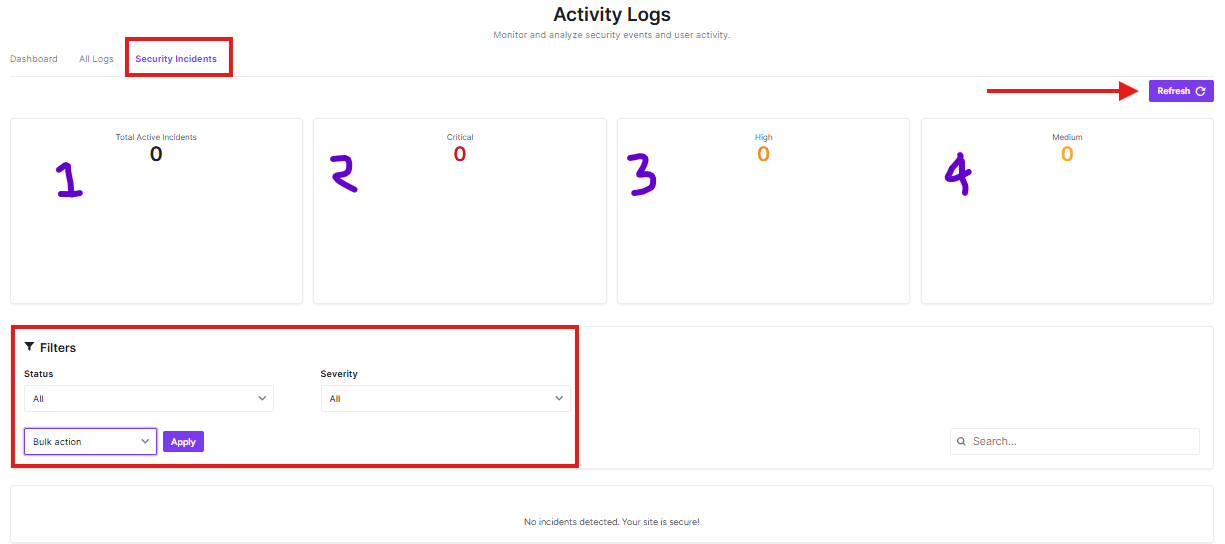
Security Incidents Tab
Click on this tab to view only security-related events, instead of all site activities.
Refresh Button
Click this purple button to get the latest security incident information.
Incident Statistics
These boxes show you at a glance:
- Total Active Incidents: How many security issues are currently active
- Critical: Most serious security problems
- High: Important security issues
- Medium: Less serious but still important issues
Filters Section
Use these to narrow down what incidents you see:
- Status: Choose to see all incidents or specific ones
- Severity: Filter by how serious the incidents are
- Bulk action: Select multiple incidents to take action on them at once
- Apply: Click to apply your filter settings
Search Bar
Use this to find specific security incidents by searching for details.
What You’ll See
When your site has no security issues, you’ll see a message saying, “No incidents detected. Your site is secure!” This is good news!
Why Use Security Incidents?
- Focus only on important security matters
- Quickly see if your site has any vulnerabilities
- Monitor for suspicious activity
- Take action on multiple incidents at once
The Security Incidents tab helps you stay on top of your site’s security without being overwhelmed by normal site activity.


