
Skip to content

Documentation site for Ultimate Security plugin for WordPress.

Documentation site for Ultimate Security plugin for WordPress.

Getting Started

2
  • System Requirements
  • Installation

How It Works?

5
  • Login & Authentication
  • Threat Protection
  • Site Hardening
  • Maintenance & Tools
  • Monitoring & Diagnostics

Dashboard

1
  • Dashboard

Vulnerability Scanner

2
  • Vulnerability Scanner Dashboard
  • Scan History

Dashboard

1
  • Vulnerability Scanner Dashboard

Scan History

1
  • Scan History

Settings

1
  • Vulnerability Scanner Settings

Configure API Key

1
  • Vulnerability Scanner Settings

Configure API Key

1
  • Vulnerability Scanner Settings

Activity Logs & Monitoring

3
  • Activity All Logs
  • Activity Logs Dashboard
  • Security Incidents

Dashboard

1
  • Activity Logs Dashboard

All Logs

1
  • Activity All Logs

Security Incidents

1
  • Security Incidents

Alerts & Notifications

2
  • Alerts & Notifications
  • History

Settings

1
  • Alerts & Notifications

History

1
  • History

Login & Authentication

6
  • Overview
  • Email OTP
  • Authentication Apps
  • Custom Login URL
  • Password Requirements
  • Settings

Two-Factor Authentication

3
  • Overview
  • Email OTP
  • Authentication Apps

Login Hardening

2
  • Custom Login URL
  • Password Requirements

Session Management

1
  • Settings

Threat Protection

4
  • Google reCAPTCHA
  • Cloudflare Turnstile
  • Login Attempts
  • Lockout Notifications

Bot Protection

2
  • Google reCAPTCHA
  • Cloudflare Turnstile

Brute Force Protection

2
  • Login Attempts
  • Lockout Notifications

Site Hardening

9
  • Content Protection Overview
  • Text Protection
  • Image Protection
  • Keyboard Shortcut
  • Display Settings
  • API & Data Privacy
  • Plugin Updates
  • Theme Updates
  • Security Hardening

Content Protection

5
  • Content Protection Overview
  • Text Protection
  • Image Protection
  • Keyboard Shortcut
  • Display Settings

Security Keys

1
  • WordPress Security Keys

API & Data Privacy

1
  • API & Data Privacy

Update Manager

3
  • Plugin Updates
  • Theme Updates
  • Update History

Security Hardening

1
  • Security Hardening

Monitor & Diagnostics

3
  • Site Health
  • Error Notifications
  • Test Mode

Error Notifications

1
  • Error Notifications

Test Mode

1
  • Test Mode

Maintenance & Tools

6
  • Comments Management
  • Backup & Restore
  • Security Tools
  • Advanced Settings
  • Database Cleanup
  • Self Defense
View Categories
  • Home
  • Docs
  • Activity Logs & Monitoring
  • Activity All Logs

Activity All Logs

1 min read

Activity logs help you monitor and analyze security events and user activity on your WordPress site. This feature records everything that happens on your site, so you can see who did what and when.
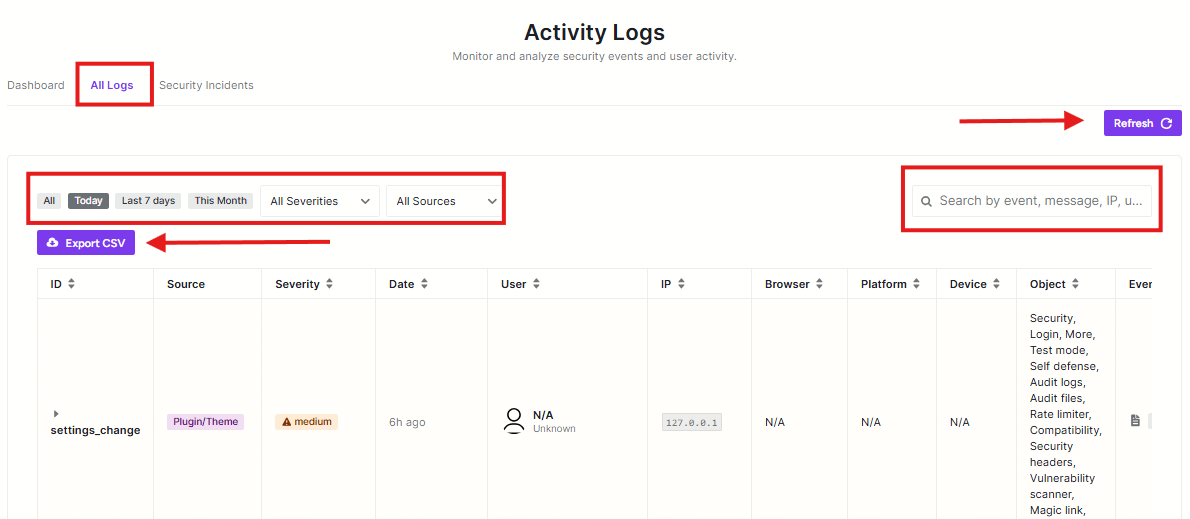
activity all logs

All Logs Tab

This is the main view showing all recorded activities on your site.

Refresh Button

Click this purple button to get the latest activity log information.

Time Filters

These help you narrow down what logs you see:

  • All: Shows all logs
  • Today: Shows only today’s activities
  • Last 7 days: Shows activities from the past week
  • This Month: Shows activities from the current month

Severity Filter

Choose to see logs with specific importance levels.

Sources Filter

Filter logs by where they came from.

Export CSV Button

Click this purple button to download your activity logs as a CSV file for record-keeping or analysis.

Search Bar

Use this to find specific events by searching for:

  • Event names
  • Messages
  • IP addresses
  • User information

Log Table

The table shows detailed information about each activity:

  • ID: Unique identifier for the log entry
  • Source: Where the activity came from
  • Severity: How important the event is
  • Date: When it happened
  • User: Who performed the action
  • IP: The user’s IP address
  • Browser/Platform/Device: Technical details about the user’s setup
  • Object: What was affected
  • Event: What happened

Why Use Activity Logs?

  • Keep track of who’s accessing your site
  • Monitor for suspicious activity
  • See when changes are made to your site
  • Maintain a record of site events for security purposes

The activity logs help you stay aware of everything happening on your WordPress site and catch potential security issues early.

Updated on February 17, 2026

What are your Feelings

  • Happy
  • Normal
  • Sad

Share This Article :

  • Facebook
  • X
  • LinkedIn
  • Pinterest
Security IncidentsActivity Logs Dashboard

Powered by BetterDocs

Leave a Reply Cancel reply

Your email address will not be published. Required fields are marked *

© 2026 Documentation site for Ultimate Security plugin for WordPress.


  • Home