
Skip to content

Documentation site for Ultimate Security plugin for WordPress.

Documentation site for Ultimate Security plugin for WordPress.

Getting Started

2
  • System Requirements
  • Installation

How It Works?

5
  • Login & Authentication
  • Threat Protection
  • Site Hardening
  • Maintenance & Tools
  • Monitoring & Diagnostics

Dashboard

1
  • Dashboard

Vulnerability Scanner

2
  • Vulnerability Scanner Dashboard
  • Scan History

Dashboard

1
  • Vulnerability Scanner Dashboard

Scan History

1
  • Scan History

Settings

1
  • Vulnerability Scanner Settings

Configure API Key

1
  • Vulnerability Scanner Settings

Configure API Key

1
  • Vulnerability Scanner Settings

Activity Logs & Monitoring

3
  • Activity All Logs
  • Activity Logs Dashboard
  • Security Incidents

Dashboard

1
  • Activity Logs Dashboard

All Logs

1
  • Activity All Logs

Security Incidents

1
  • Security Incidents

Alerts & Notifications

2
  • Alerts & Notifications
  • History

Settings

1
  • Alerts & Notifications

History

1
  • History

Login & Authentication

6
  • Overview
  • Email OTP
  • Authentication Apps
  • Custom Login URL
  • Password Requirements
  • Settings

Two-Factor Authentication

3
  • Overview
  • Email OTP
  • Authentication Apps

Login Hardening

2
  • Custom Login URL
  • Password Requirements

Session Management

1
  • Settings

Threat Protection

4
  • Google reCAPTCHA
  • Cloudflare Turnstile
  • Login Attempts
  • Lockout Notifications

Bot Protection

2
  • Google reCAPTCHA
  • Cloudflare Turnstile

Brute Force Protection

2
  • Login Attempts
  • Lockout Notifications

Site Hardening

9
  • Content Protection Overview
  • Text Protection
  • Image Protection
  • Keyboard Shortcut
  • Display Settings
  • API & Data Privacy
  • Plugin Updates
  • Theme Updates
  • Security Hardening

Content Protection

5
  • Content Protection Overview
  • Text Protection
  • Image Protection
  • Keyboard Shortcut
  • Display Settings

Security Keys

1
  • WordPress Security Keys

API & Data Privacy

1
  • API & Data Privacy

Update Manager

3
  • Plugin Updates
  • Theme Updates
  • Update History

Security Hardening

1
  • Security Hardening

Monitor & Diagnostics

3
  • Site Health
  • Error Notifications
  • Test Mode

Error Notifications

1
  • Error Notifications

Test Mode

1
  • Test Mode

Maintenance & Tools

6
  • Comments Management
  • Backup & Restore
  • Security Tools
  • Advanced Settings
  • Database Cleanup
  • Self Defense
View Categories
  • Home
  • Docs
  • Plugin Settings
  • Maintenance & Tools
  • Database Cleanup

Database Cleanup

3 min read

Database Stats

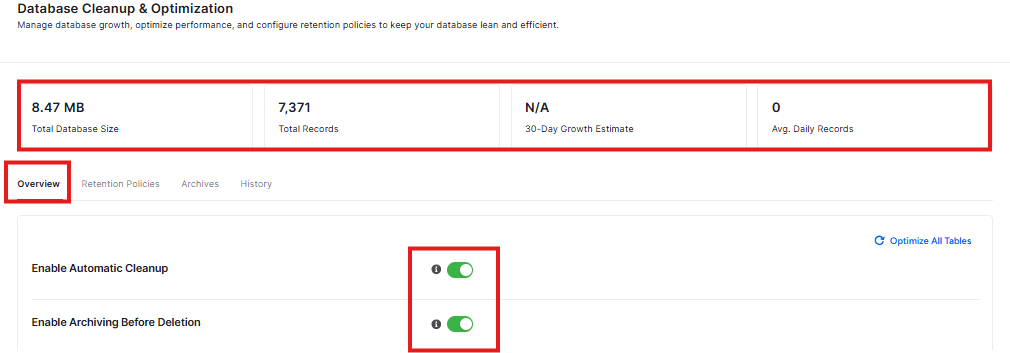
At the top, you’ll see four important numbers:
database clean up
  • Total Database Size: How big your database is (right now it shows 0 B)
  • Total Records: How many things are stored in your database (right now it shows 0)
  • 30-Day Growth Estimate: How much your database might grow in 30 days
  • Avg. Daily Records: How many new things are added each day

Overview Tab

This is the main dashboard that shows you:

  • Your total database size
  • How many records (items) are in your database
  • How your database is growing
  • Average daily records being added

Turn On Automatic Cleanup

You’ll see two toggle switches:

  1. Enable Automatic Cleanup – This automatically removes old, unnecessary data from your database
  2. Enable Archiving Before Deletion – This saves a copy of data before removing it (good for safety)

Both are turned ON by default, which is usually best for most websites.

Clean Up Your Database

In the “Database Cleanup” section, you can:

  • Select which tables (parts of your database) to clean
  • Delete old records that you don’t need anymore

Right now, it shows “No log tables found” which means your database is already clean!

Retention Policies Tab

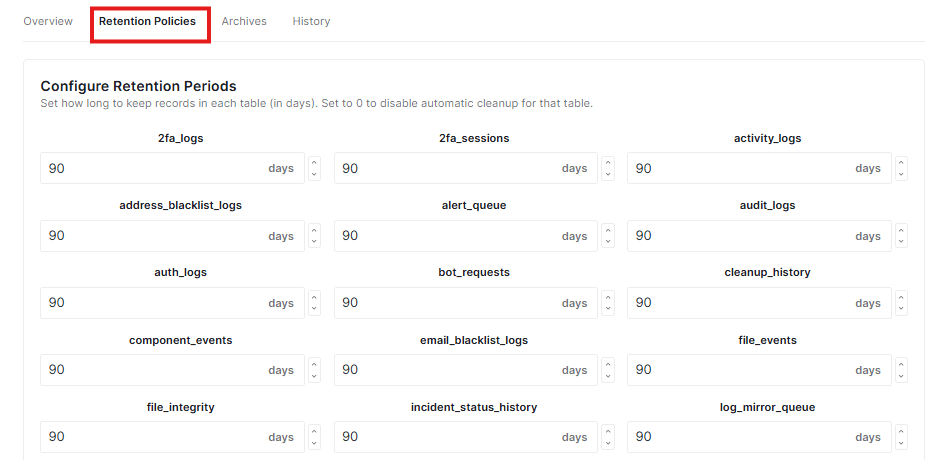
This tab helps you control how long data stays in your database.
retention policy

What It Does:

  • Configure Retention Periods: You can set how many days to keep records in each part of your database
  • Save Retention Policies: Click this blue button to save your settings

Why This Matters:

  • Keeping your database clean means your website runs faster
  • You can choose how long to keep different types of data
  • This helps prevent your database from getting too big and slow

Archives Tab

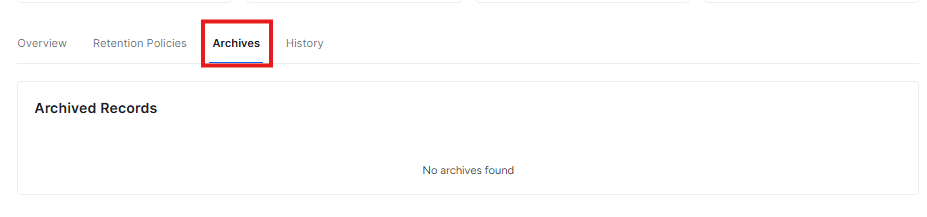
This tab shows you archived records – data that has been saved before being deleted.
archive tab

What You’ll See:

  • Archived Records: Any data that was archived (saved) before cleanup
  • Right now it shows “No archives found” which means your database is clean!

Why Archives Are Good:

  • They act like a backup before data gets deleted
  • You can review what was removed if needed
  • Makes cleanup safer because you can always restore archived data

History Tab

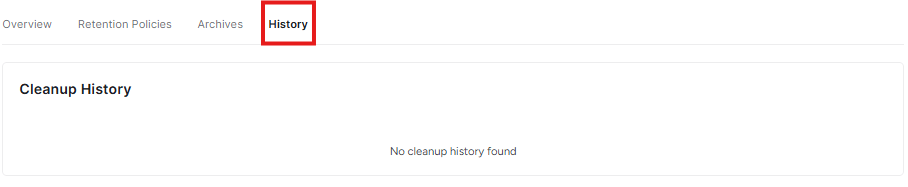
This tab keeps track of all the cleanup activities.
history tab

What It Shows:

  • Cleanup History: A log of everything the plugin has cleaned up
  • Right now it shows “No cleanup history found” which means the plugin hasn’t done any cleanups yet, or it’s a new installation

Why History Is Helpful:

  • You can see what was cleaned and when
  • Helps you track how your database is being maintained
  • Good for troubleshooting if something goes wrong

Important Tips:

  • Always save your changes by clicking “Save Changes” at the bottom
  • If you make a mistake, you can “Discard Changes” to go back
  • Start with the default settings if you’re not sure what to do
  • These features help keep your website fast and secure!

Important Notes

  • Automatic cleanup helps keep your site running fast
  • Archiving before deletion is like making a backup before cleaning – it’s safer
  • You can always turn these features off if you prefer to clean your database manually
  • Click “Save Changes” to keep your settings, or “Discard Changes” to go back to how things were
Updated on February 16, 2026

What are your Feelings

  • Happy
  • Normal
  • Sad

Share This Article :

  • Facebook
  • X
  • LinkedIn
  • Pinterest
Advanced SettingsSelf Defense

Powered by BetterDocs

Leave a Reply Cancel reply

Your email address will not be published. Required fields are marked *

© 2026 Documentation site for Ultimate Security plugin for WordPress.


  • Home