
API (Application Programming Interface) privacy helps protect your website by hiding information that WordPress normally shows to the public. Think of it like putting curtains on your windows – it keeps prying eyes from seeing what’s inside.
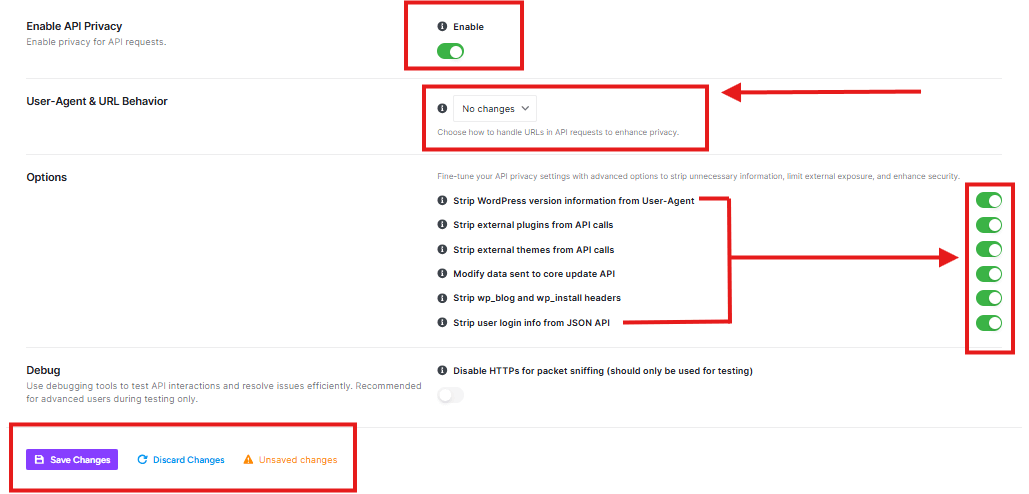
Enable API Privacy
This toggle turns API privacy ON or OFF.
- When ON: Your website hides sensitive information from outsiders
- When OFF: Your website shows more information (less secure)
User-Agent & URL Behavior
This setting controls how your website handles web addresses (URLs) in API requests.
Options
These are extra privacy protections you can enable:
Strip WordPress version information from User-Agent
- What it does: Hides which version of WordPress you’re using
- Why helpful: Hackers can’t target known vulnerabilities in your specific WordPress version
Strip external plugins from API calls
- What it does: Hides information about plugins you’ve installed
- Why helpful: Prevents hackers from knowing which plugins might have security issues
Strip external themes from API calls
- What it does: Hides information about your website’s theme
- Why helpful: Stops hackers from targeting theme-specific vulnerabilities
Modify data sent to core update API
- What it does: Changes how update information is sent
- Why helpful: Adds an extra layer of security during updates
Strip wp_blog and wp_install headers
- What it does: Removes identifying headers from your site
- Why helpful: Makes it harder for attackers to gather information about your site
Strip user login info from JSON API
- What it does: Hides user login details in API responses
- Why helpful: Protects your users’ login information
Debug Settings
Disable HTTPS for packet sniffing
- What it does: Temporarily turns off secure connections (only for testing)
- Important: Should only be used by advanced users during testing
- Warning: Not for regular use – keeps your site less secure
Save Changes: Applies all your privacy settings
Discard Changes: Ignores any changes you’ve made


