
The Quarantine Manager is a critical security feature designed to neutralize potential threats on your website without permanently removing files immediately. When the system identifies a suspicious file, it automatically moves it to a secure, isolated location where it cannot be executed or cause harm to your site.
How it Works
When a file is moved to the Quarantine Manager, it is effectively “locked away.” This allows you to inspect the file, verify if it was a false positive, or remove it entirely if it is indeed malicious.
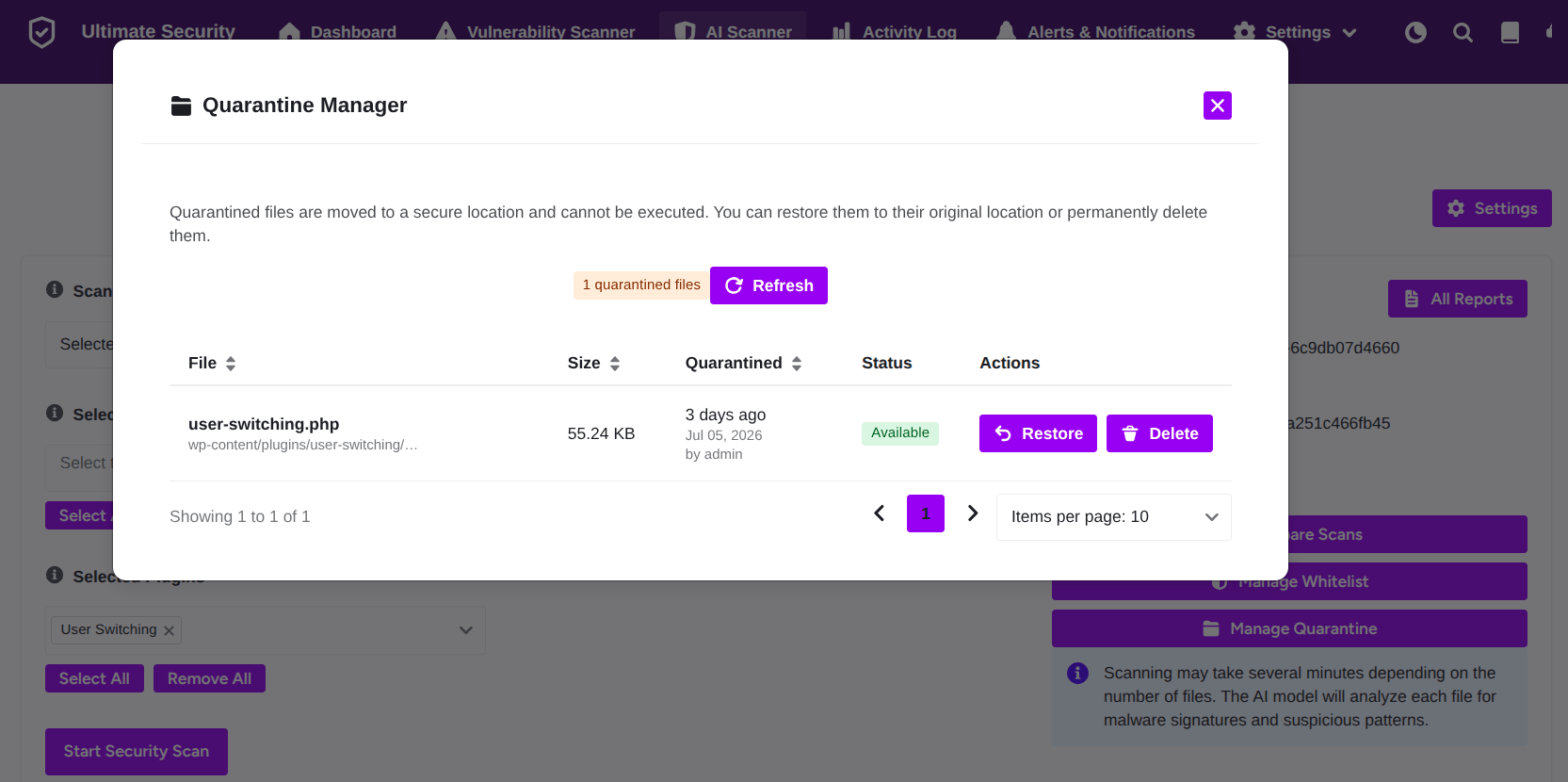
Key Components of the Dashboard
- Quarantined Files Count: Displays the total number of files currently held in quarantine.
- Refresh Button: Click this to update the list and see the most recent status of your quarantined files.
- File Details Table: Provides a comprehensive view of:
- File Name & Path: Identifies the specific file and its original location on your server.
- Size: Shows the file’s storage size.
- Quarantined Date: Tracks exactly when the file was isolated.
- Status: Indicates the current availability of the file.
- Actions: Offers two primary choices for managing the file.
Managing Quarantined Files
You have two options for handling files in the Quarantine Manager:
- Restore: If you know the file is safe and was incorrectly flagged, click Restore. This will move the file back to its original location on your website.
- Delete: If you have confirmed the file is malicious or no longer needed, click Delete to permanently remove it from your server.


