
This page helps you control how your website updates itself. Updates are important because they:
- Fix security issues
- Add new features
- Keep your site running smoothly
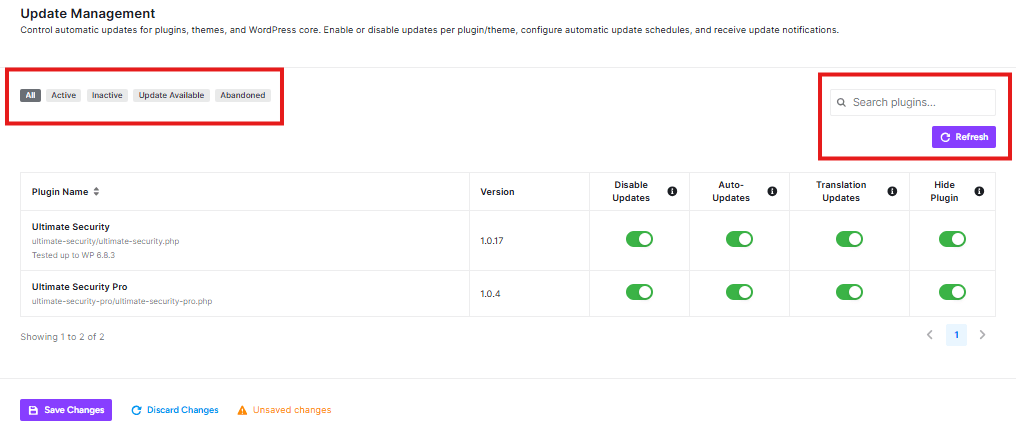
Plugin Updates Section
This specific section shows updates for the plugins (extra features) installed on your website.
Filter Tabs
You can filter plugins by their status:
- All: Shows every plugin
- Active: Shows only plugins that are currently working
- Inactive: Shows plugins that are turned off
- Update Available: Shows plugins that need updates
- Abandoned: Shows plugins that aren’t maintained anymore
Search and Refresh
- Search plugins: Find specific plugins quickly
- Refresh: Get the latest update information
Plugin List
Your page shows two security plugins:
- Ultimate Security (version 1.0.17)
- Ultimate Security Pro (version 1.0.4)
Plugin Control Options
For each plugin, you can control:
Disable Updates:
- Turn OFF to stop this plugin from updating automatically
- Turn ON to allow automatic updates
Auto-Updates:
- Green means updates happen automatically
- Gray means you need to update manually
Translation Updates:
- Green means translation files update automatically
- Gray means you need to update translations manually
Hide Plugin:
- Hide the plugin from your dashboard (advanced option)


