
The Active Sessions dashboard provides real-time visibility into every user currently logged into your WordPress site. This monitoring tool is essential for identifying unauthorized access, tracking user behavior, and maintaining tight control over account security.
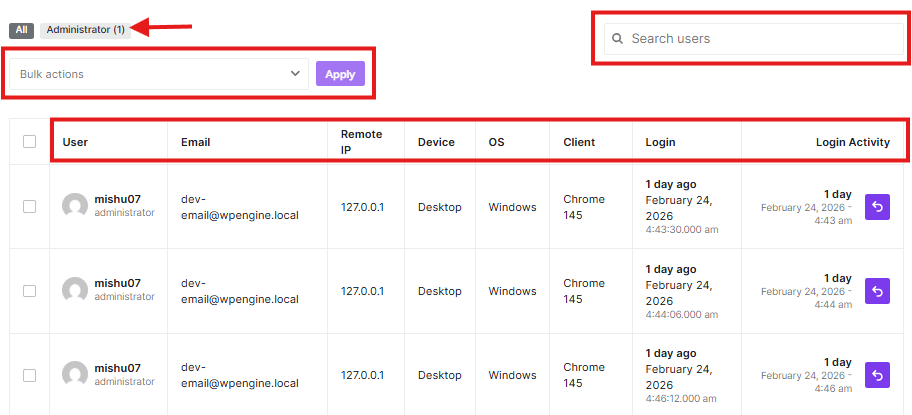
Monitoring Login Activity
The dashboard displays a comprehensive table of all live connections with the following data points:
- User Information: Displays the username and associated email address.
- Remote IP: Shows the IP address from which the user is accessing your site.
- Device & OS: Identifies if the user is on a Desktop or Mobile device and the specific Operating System (e.g., Windows, macOS).
- Client: Specifies the browser being used, such as Chrome or Firefox.
- Login Timestamp: The exact date and time the session was initiated.
- Login Activity: Tracks the duration of the current session.
Managing Sessions
You can take immediate action if you notice suspicious activity or need to clear sessions for maintenance:
- Search & Filter: Use the search bar to find specific users or filter by roles (e.g., “Administrator”) to narrow down the list.
- Individual Termination: Click the Logout (Back Arrow) icon on the far right of any row to instantly terminate that specific user’s session.
- Bulk Actions: To log out multiple users at once, select the checkboxes next to their names, choose Bulk actions from the dropdown menu, and click Apply.


