
Skip to content

Documentation site for Ultimate Security plugin for WordPress.

Documentation site for Ultimate Security plugin for WordPress.

Getting Started

2
  • System Requirements
  • Installation

How It Works?

5
  • Login & Authentication
  • Threat Protection
  • Site Hardening
  • Maintenance & Tools
  • Monitoring & Diagnostics

Dashboard

1
  • Dashboard

Vulnerability Scanner

2
  • Vulnerability Scanner Dashboard
  • Scan History

Dashboard

1
  • Vulnerability Scanner Dashboard

Scan History

1
  • Scan History

Settings

1
  • Vulnerability Scanner Settings

Configure API Key

1
  • Vulnerability Scanner Settings

Configure API Key

1
  • Vulnerability Scanner Settings

Activity Logs & Monitoring

3
  • Activity All Logs
  • Activity Logs Dashboard
  • Security Incidents

Dashboard

1
  • Activity Logs Dashboard

All Logs

1
  • Activity All Logs

Security Incidents

1
  • Security Incidents

Alerts & Notifications

2
  • Alerts & Notifications
  • History

Settings

1
  • Alerts & Notifications

History

1
  • History

Login & Authentication

6
  • Overview
  • Email OTP
  • Authentication Apps
  • Custom Login URL
  • Password Requirements
  • Settings

Two-Factor Authentication

3
  • Overview
  • Email OTP
  • Authentication Apps

Login Hardening

2
  • Custom Login URL
  • Password Requirements

Session Management

1
  • Settings

Threat Protection

4
  • Google reCAPTCHA
  • Cloudflare Turnstile
  • Login Attempts
  • Lockout Notifications

Bot Protection

2
  • Google reCAPTCHA
  • Cloudflare Turnstile

Brute Force Protection

2
  • Login Attempts
  • Lockout Notifications

Site Hardening

9
  • Content Protection Overview
  • Text Protection
  • Image Protection
  • Keyboard Shortcut
  • Display Settings
  • API & Data Privacy
  • Plugin Updates
  • Theme Updates
  • Security Hardening

Content Protection

5
  • Content Protection Overview
  • Text Protection
  • Image Protection
  • Keyboard Shortcut
  • Display Settings

Security Keys

1
  • WordPress Security Keys

API & Data Privacy

1
  • API & Data Privacy

Update Manager

3
  • Plugin Updates
  • Theme Updates
  • Update History

Security Hardening

1
  • Security Hardening

Monitor & Diagnostics

3
  • Site Health
  • Error Notifications
  • Test Mode

Error Notifications

1
  • Error Notifications

Test Mode

1
  • Test Mode

Maintenance & Tools

6
  • Comments Management
  • Backup & Restore
  • Security Tools
  • Advanced Settings
  • Database Cleanup
  • Self Defense
View Categories
  • Home
  • Docs
  • Plugin Settings
  • Site Hardening
  • Content Protection
  • Text Protection

Text Protection

< 1 min read

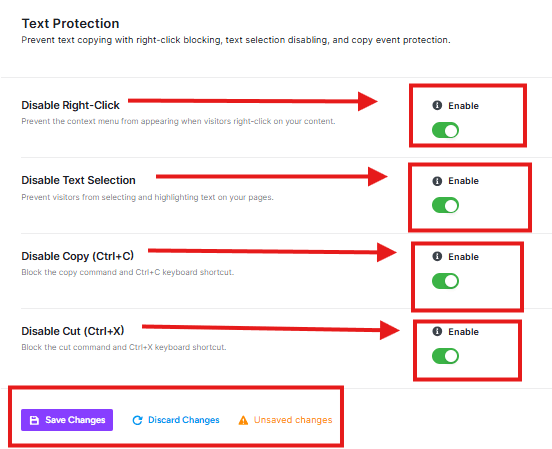
This feature helps protect the text content on your website from being copied by visitors.
ultimate security text protection

Disable Right-Click

This stops visitors from right-clicking on your site. This prevents them from copying your text or saving your images.

Disable Text Selection

This stops visitors from selecting text on your pages by highlighting it, making it impossible to copy text.

Disable Copy (Ctrl+C)

This blocks the standard keyboard shortcut (Ctrl+C) on Windows or Command+C on (Mac) that people use to copy selected text.

Disable Cut (Ctrl+X)

This blocks the standard keyboard shortcut (Ctrl+X) on Windows or Command+X on (Mac) that people use to cut selected text.

Save or Discard button to apply changes

Updated on February 15, 2026

What are your Feelings

  • Happy
  • Normal
  • Sad

Share This Article :

  • Facebook
  • X
  • LinkedIn
  • Pinterest
Content Protection OverviewImage Protection

Powered by BetterDocs

Leave a Reply Cancel reply

Your email address will not be published. Required fields are marked *

© 2026 Documentation site for Ultimate Security plugin for WordPress.


  • Home