
This setting helps you stop automated robots from guessing your password.
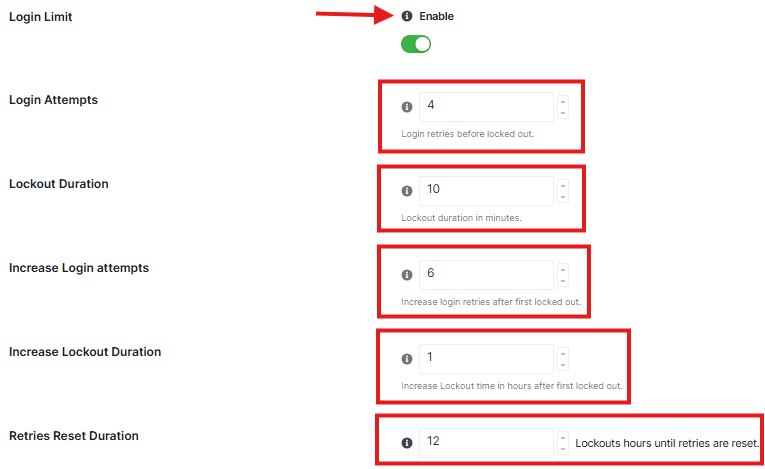
Login Limit
- This is the main switch that activates the protection.
Login Attempts
- This tells the plugin how many times someone is allowed to type the wrong password. If someone guesses wrong 4(the default) times, we immediately block them.
Lockout Duration:
- This is how long the person is “put in timeout” after guessing wrong too many times. They will have to wait certain time before they can try again.
Increase Login attempts:
- If the same person gets locked out in hours, the plugin decides they are a serious threat and gets tougher.
Increase Lockout Duration:
- Once they are marked as a serious threat, we Increase Lockout time in hours after first lockout.
Retries Reset Duration:
- Sometimes a real user just forgets their password. This setting tells the plugin: If they haven’t tried to log in for a particular hour, forget about their past mistakes and let them start fresh.
Block Users

- Stop a specific person from logging into your website.
- In the input box, type the exact username of the person you want to block.
- Select All: Click this if you want to highlight every user currently on your blocked list at the same time.
- Remove All: Click this to clear the entire list and unblock everyone.
Recovery URL
Use this link if you ever get locked out of your account. So please keep it private and store it somewhere safe offline

Please follow these steps carefully:
- Generate Key: Click the Generate Key button. The plugin will create a secret link just for you.
- Copy: Click the Copy button to save that link to your computer’s clipboard.
- Save It Somewhere Safe: This is the most important step. Paste that link into a document on your computer, write it in a notebook, or save it in a password manager.
- ⚠️ Important Warning: Do not lose this link. If you get locked out, this is the only way you can get back in to manage your site. Keep it private and do not share it with anyone.
NOTE: Once you have these settings how you like them, click Save Changes


