
Login for WooCommerce
This setting integrates passkey authentication directly into your e-commerce storefront.
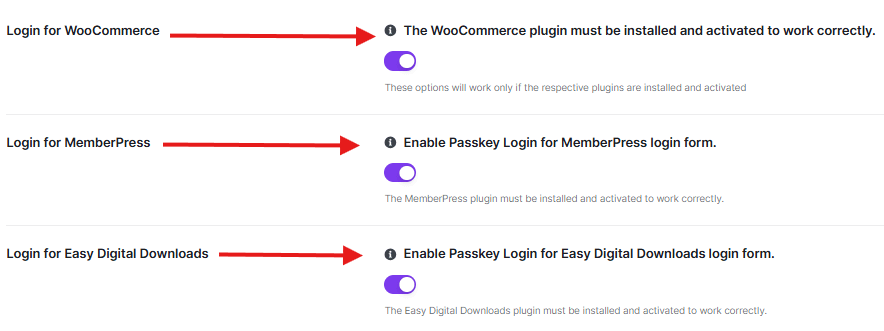
- Function: Toggle to Enable to add the passkey login option to the WooCommerce “My Account” and checkout login forms.
- Requirement: The WooCommerce plugin must be installed and activated on your site for this option to work correctly.
Login for MemberPress
This integration is designed for membership sites requiring high-level account security.
- Function: Toggle to Enable to allow members to log in to their accounts using passkeys on MemberPress-generated login forms.
- Requirement: The MemberPress plugin must be installed and activated for this toggle to have an effect.
Login for Easy Digital Downloads
Ensure your digital marketplace is protected with modern authentication.
- Function: Toggle to Enable to provide a passkey login alternative for your Easy Digital Downloads (EDD) customers.
- Requirement: The Easy Digital Downloads plugin must be installed and activated to utilize this feature.
Login Short Code
This shortcode allows you to place a “Login via Passkey” button anywhere on your site, such as custom landing pages or sidebars.
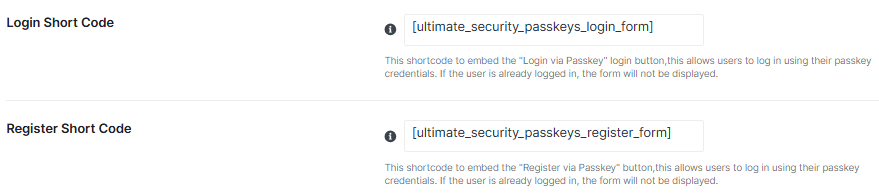
- Shortcode:
[ultimate_security_passkeys_login_form] - Function: Embeds the login button to allow users to authenticate using their registered passkey credentials.
- Note: If a user is already logged in, the form will remain hidden to maintain a clean user interface.
Register Short Code
Use this shortcode to create custom registration areas for users to link their devices.
- Shortcode:
[ultimate_security_passkeys_register_form] - Function: Embeds the “Register via Passkey” button, allowing logged-in users to set up new passkey credentials.
- Note: Similar to the login shortcode, this form will not be displayed if the user session does not require it.
Display Passkeys in Users List
This option enhances the standard WordPress User management screen with security insights.
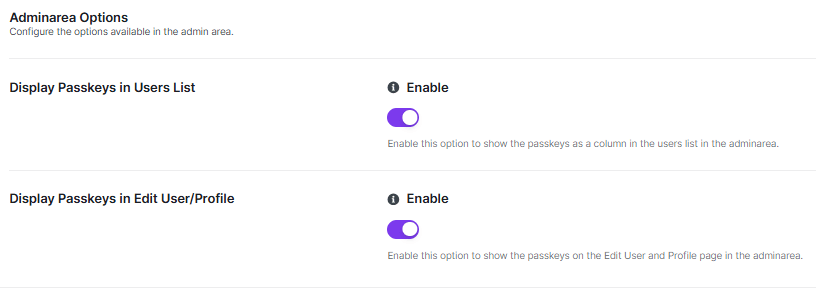
- Function: Toggle to Enable to add a dedicated “Passkeys” column to the administrative Users list.
- Benefit: Allows administrators to see at a glance which users have secured their accounts with biometric or device-based authentication.
Display Passkeys in Edit User/Profile
This setting integrates passkey management directly into individual user profiles.
- Function: Toggle to Enable to show registered passkeys on the Edit User and Profile pages within the admin area.
- Benefit: Provides a centralized location for admins or users to view and manage their existing security keys.
Always remember to click Save Changes after updating your shortcode or admin area preferences to ensure the new display settings take effect.


