
Skip to content

Documentation site for Ultimate Security plugin for WordPress.

Documentation site for Ultimate Security plugin for WordPress.

Getting Started

2
  • System Requirements
  • Installation

How It Works?

5
  • Login & Authentication
  • Threat Protection
  • Site Hardening
  • Maintenance & Tools
  • Monitoring & Diagnostics

Dashboard

1
  • Dashboard

Vulnerability Scanner

2
  • Vulnerability Scanner Dashboard
  • Scan History

Dashboard

1
  • Vulnerability Scanner Dashboard

Scan History

1
  • Scan History

Settings

1
  • Vulnerability Scanner Settings

Configure API Key

1
  • Vulnerability Scanner Settings

Configure API Key

1
  • Vulnerability Scanner Settings

Activity Logs & Monitoring

3
  • Activity All Logs
  • Activity Logs Dashboard
  • Security Incidents

Dashboard

1
  • Activity Logs Dashboard

All Logs

1
  • Activity All Logs

Security Incidents

1
  • Security Incidents

Alerts & Notifications

2
  • Alerts & Notifications
  • History

Settings

1
  • Alerts & Notifications

History

1
  • History

Login & Authentication

6
  • Overview
  • Email OTP
  • Authentication Apps
  • Custom Login URL
  • Password Requirements
  • Settings

Two-Factor Authentication

3
  • Overview
  • Email OTP
  • Authentication Apps

Login Hardening

2
  • Custom Login URL
  • Password Requirements

Session Management

1
  • Settings

Threat Protection

4
  • Google reCAPTCHA
  • Cloudflare Turnstile
  • Login Attempts
  • Lockout Notifications

Bot Protection

2
  • Google reCAPTCHA
  • Cloudflare Turnstile

Brute Force Protection

2
  • Login Attempts
  • Lockout Notifications

Site Hardening

9
  • Content Protection Overview
  • Text Protection
  • Image Protection
  • Keyboard Shortcut
  • Display Settings
  • API & Data Privacy
  • Plugin Updates
  • Theme Updates
  • Security Hardening

Content Protection

5
  • Content Protection Overview
  • Text Protection
  • Image Protection
  • Keyboard Shortcut
  • Display Settings

Security Keys

1
  • WordPress Security Keys

API & Data Privacy

1
  • API & Data Privacy

Update Manager

3
  • Plugin Updates
  • Theme Updates
  • Update History

Security Hardening

1
  • Security Hardening

Monitor & Diagnostics

3
  • Site Health
  • Error Notifications
  • Test Mode

Error Notifications

1
  • Error Notifications

Test Mode

1
  • Test Mode

Maintenance & Tools

6
  • Comments Management
  • Backup & Restore
  • Security Tools
  • Advanced Settings
  • Database Cleanup
  • Self Defense
View Categories
  • Home
  • Docs
  • Activity Logs & Monitoring
  • Activity Logs Dashboard

Activity Logs Dashboard

1 min read

The Activity Logs Dashboard gives you a quick overview of what’s been happening on your WordPress site. It shows you important statistics and recent events to help you monitor your site’s activity.
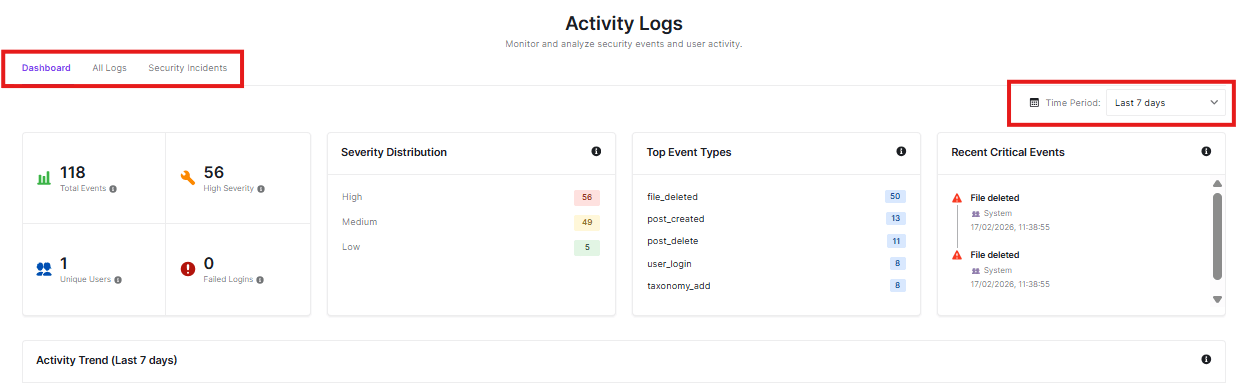
activity log dasboard

Navigation Tabs

  • Dashboard: Current view showing statistics and summaries
  • All Logs: View all recorded activities
  • Security Incidents: See only important security-related events

Time Period Filter

Choose how far back you want to see activity:

  • You can change this to see different time ranges

Statistics Overview

These boxes give you quick insights:
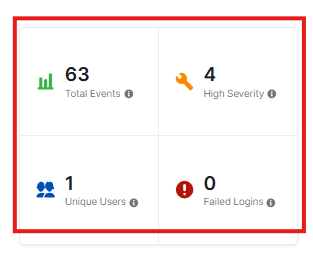
statistics overview
  • Total Events: How many activities have occurred (63 in this example)
  • High Severity: Number of important security events
  • Unique Users: How many different people have been active
  • Failed Logins: Any unsuccessful login attempts

Severity Distribution

This shows how serious the events were:
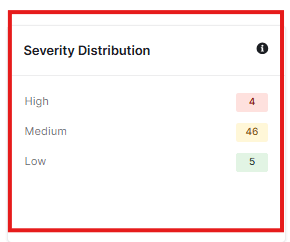
severity distribution
  • High: Most critical events
  • Medium: Moderately important events
  • Low: Less critical events

Top Event Types

See what activities happen most often:
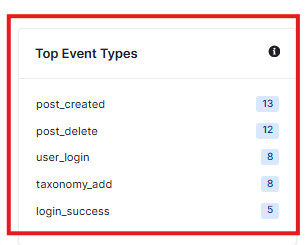
top event types
  • post_created: New posts or pages added
  • post_delete: Posts or pages removed
  • user_login: Users logging in
  • taxonomy_add: Categories or tags created
  • login_success: Successful logins

Recent Critical Events

This section shows the most important recent activities:
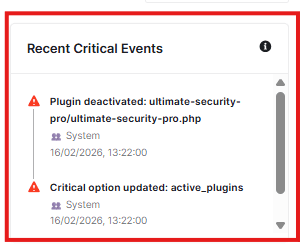
recent critical events
  • Plugin deactivations
  • Critical setting changes
  • When they happened

Activity Trend

This is a visual graph of security events over time, which gives you an idea of patterns and unusual activity spikes
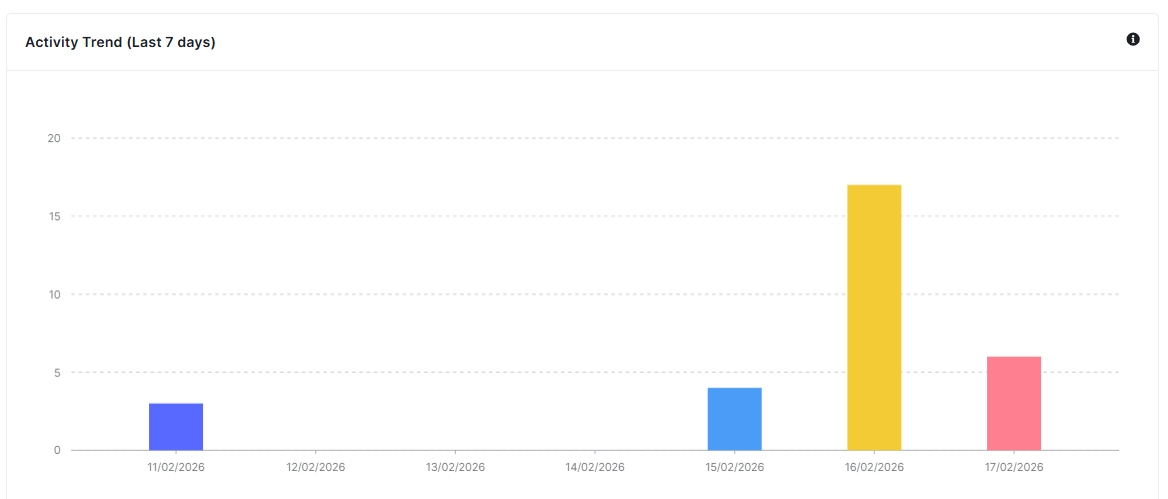
activity trend

Why Use the Dashboard?

  • Get a quick summary of your site’s activity
  • Spot unusual patterns or security issues
  • See what changes have been made recently
  • Monitor user activity and security events

The dashboard helps you stay aware of your site’s health and catch potential problems early.

Updated on February 17, 2026

What are your Feelings

  • Happy
  • Normal
  • Sad

Share This Article :

  • Facebook
  • X
  • LinkedIn
  • Pinterest
Activity All LogsSecurity Incidents

Powered by BetterDocs

Leave a Reply Cancel reply

Your email address will not be published. Required fields are marked *

© 2026 Documentation site for Ultimate Security plugin for WordPress.


  • Home