
It is an extra layer of multi-factor authentication with email OTP, authenticator apps, SMS authentication, and backup recovery codes.
Navigate to Ultimate Security > Login Authentication
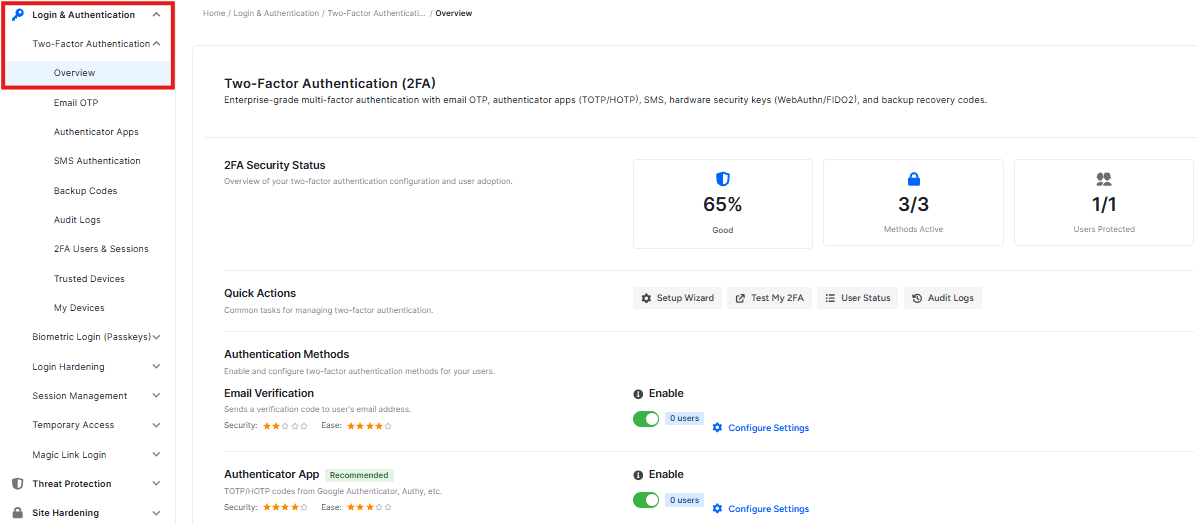
2FA Security Status
At the top of the page, you will find three key metrics:

Security Status
- Indicates the 2FA system is active and working correctly
Active Methods
- See your 2FA options here. Click ‘Compare method’ to see a table at the bottom that explains the differences between each method.
User Adoption
- Tracks how many users on your site have actually set up 2FA for their account.
Quick Actions
This section provides shortcuts to manage your two-factor authentication settings:

- Test 2FA: Verify your current setup by clicking here. You will be taken to a dashboard where you can choose to test either email or an authenticator app.
- Setup Wizard: Follow a guided flow to configure 2FA. You can select email OTP or an authenticator app. The wizard walks you through Level -> Method -> Roles -> Review steps before leading you to the final configuration page.
- View User Status: See which users on your site currently have 2FA enabled.
- Audit Logs: Review a history of authentication events and activities
Authentication Methods
This section helps you compare the two available security methods to decide which one to use.
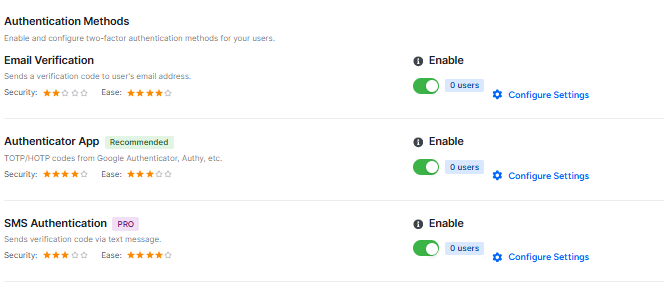
- Email Verification: This method is easy to set up and does not require any extra applications.
- Authenticator App (Recommended): This option is very secure and easy to use. It requires a smartphone.
You can view the security rating, pros, and cons for each method. To start setting up a method, click the Configure button.


