
Activity Log
Search and filter the passkey activity log by user, event type and date to review registrations, sign-ins and status changes.
On this page
The Activity Log tab provides a comprehensive audit trail for administrators to monitor, search, and audit all passkey-related events and authentication activities across your site.
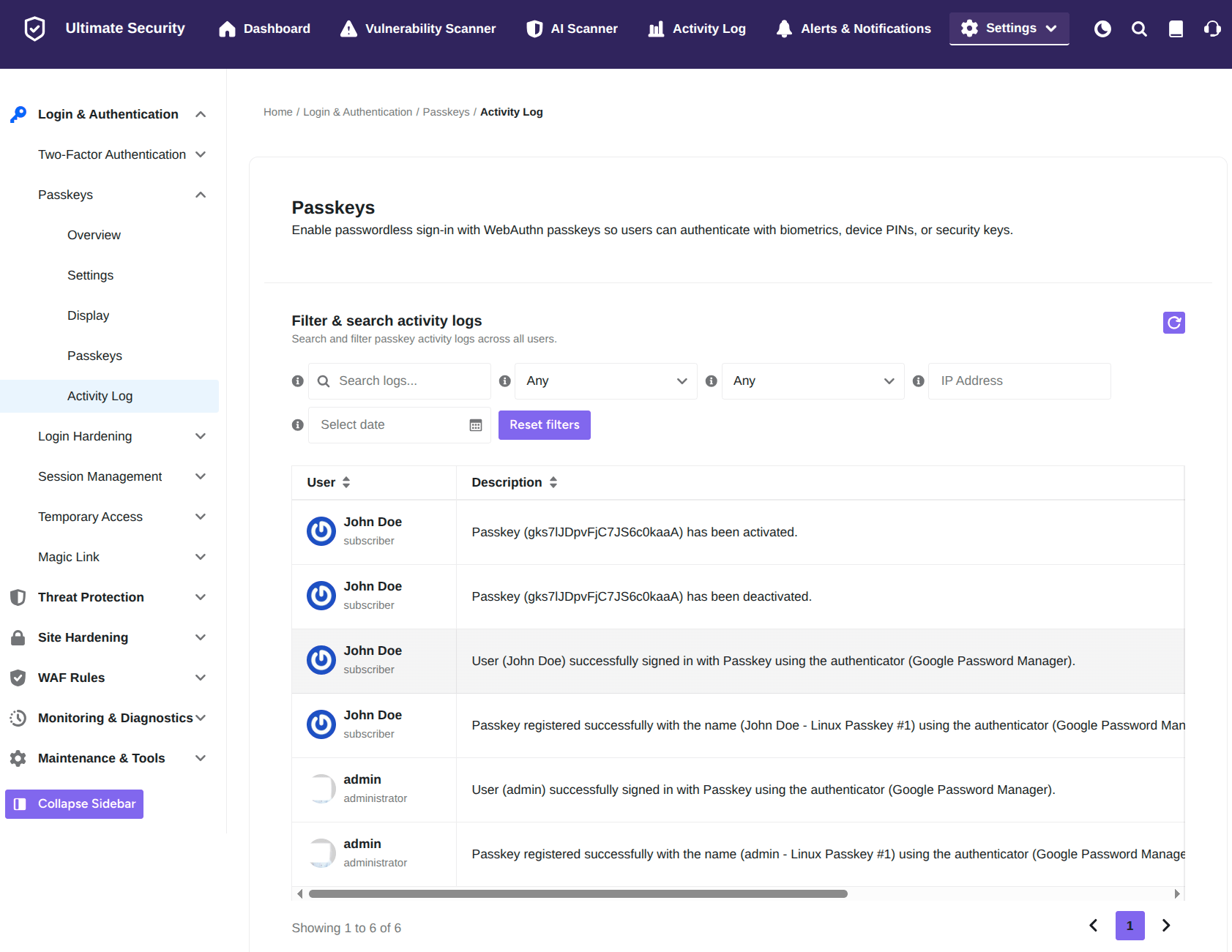
Filter & Search Activity Logs
Filter activity logs using specific parameters to quickly pinpoint security events.
- Refresh Button: Click the purple refresh icon at the top right to update the table with the latest real-time events.
- Search Input Field: Type keywords into Search logs… to filter records by specific users, events, or credential IDs.
- Event Type Dropdowns: Select specific event categories from the Any dropdown menus to isolate particular actions (such as logins, registrations, activations, or deactivations).
- IP Address Field: Enter an IP address into IP Address to view all passkey activities originating from a specific network address.
- Select Date: Click the calendar picker to filter events that occurred on a specific date.
- Reset Filters: Click Reset filters to restore default settings and clear all search strings and selections.
Activity Log Overview
The main table logs step-by-step passkey events recorded across the platform.
- User: Displays the account owner’s display name along with their WordPress user role.
- Description: Details the exact passkey activity performed, including:
- Passkey registration (specifying key label and authenticator type used).
- Passkey sign-in events (showing successful authentication details).
- Passkey status changes (logs when a passkey is activated or deactivated).
Was this article helpful?
Thanks for the feedback.