
Vulnerability Scanner Settings
Add WPScan and Patchstack API keys, set scan frequency and the abandoned threshold, and choose which severity levels send email alerts.
On this page
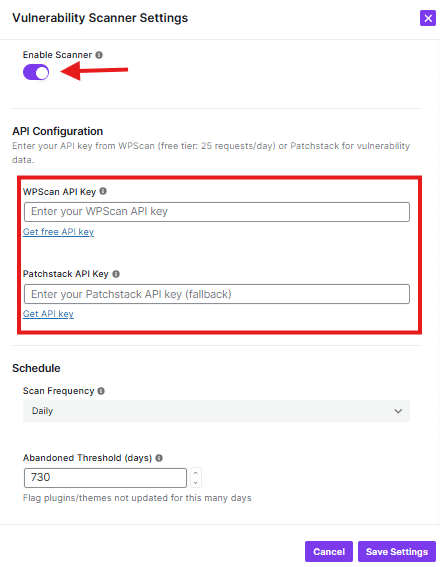
This window helps you configure the scanner.
What You Can Configure:
API Configuration:
- WPScan API Key: Get WPScan API key, and paste it into the field
- Patchstack API Key: Get Patchstack API key, and paste it into the field
Schedule:
- Scan Frequency: Choose how often to scan (currently set to “Daily”)
- Abandoned Threshold: Set how many days to check for abandoned plugins/themes
Notifications:
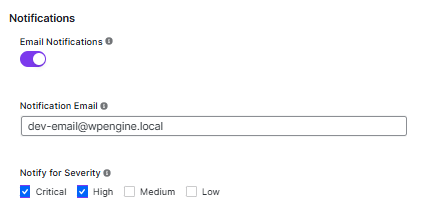
- Email Notifications: Toggle ON/OFF (currently ON)
- Notification Email: Enter the email address to receive alerts
- Severity Levels: Choose which types of issues to notify about (Critical, High, Medium, Low)
Buttons:
- Cancel: Close without saving
- Continue: Save your settings
Was this article helpful?
Thanks for the feedback.