
Magic Link Logs
Review magic link activity counters, filter and search the event log, export it to CSV, and delete entries you no longer need.
On this page
The Magic Link Logs screen tracks all passwordless login attempts made through magic links on your website. This page helps you monitor who is requesting magic links, where the requests come from, and whether they succeeded or failed.
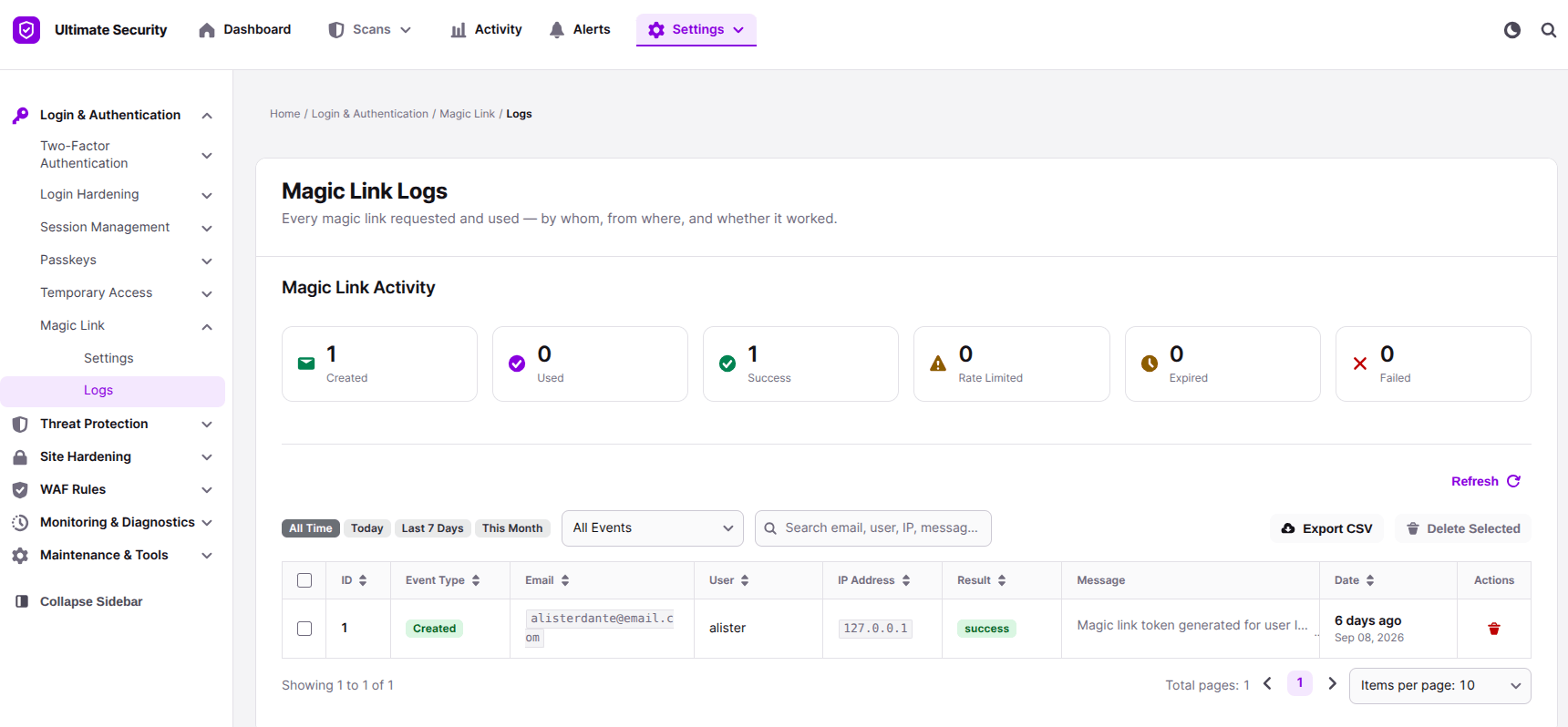
Understanding the Summary Counters
At the top of the page, six metric cards give you a quick overview of magic link activity:
- Created: Total number of magic links.
- Used: Number of magic links used.
- Success: Total successful login events completed via magic link.
- Rate Limited: Number of requests blocked because a user exceeded the allowed request limit.
- Expired: Number of magic links that passed their expiration time without being used.
- Failed: Number of failed login attempts using a magic link.
Managing and Filtering Log Data
The main table lists every event with detailed columns: ID, Event Type, Email, User, IP Address, Result, Message, and Date. You can use the search and filter tools above the table to find specific records:
- Time Filters: Quick-select logs by All Time, Today, Last 7 Days, or This Month.
- Event Filters: Filter records by specific event statuses using the dropdown menu.
- Search Bar: Search for records using an email address, username, IP address, or message text.
- Export and Clean Up: Click Export CSV to download log data for external reporting, or select rows and click Delete Selected to clear unwanted log entries. You can also delete individual rows using the trash icon in the Actions column.
Was this article helpful?
Thanks for the feedback.